Arduino
LED Cube
Build a 27-LED cube with layer multiplexing and POV animations using Arduino Uno.
LED
Cube
Multiplexing
Arduino Uno
3x3x3 LED Cube
A simplified version of the 8x8x8 LED Cube project, adapted for beginners.

How It Works
The cube uses layer multiplexing:
- 9 columns (LED anodes) are connected to Arduino digital pins through 220 Ω resistors.
- 3 layers (LED cathodes) are controlled via NPN transistors (2N2222 / BC547).
- Arduino rapidly switches layers (POV — persistence of vision), creating the illusion that all 27 LEDs are lit simultaneously.
     Top view (column numbering):

         C0   C1   C2
         C3   C4   C5
         C6   C7   C8

     Layers (side view):
         Layer 2 (top)
         Layer 1 (middle)
         Layer 0 (bottom)
Bill of Materials
| Component | Quantity | Notes |
|---|---|---|
| Arduino Uno (CH340) | 1 | Or Nano |
| LED 5mm (any color) | 27 | Can use 3 colors, 9 each |
| 220 Ω resistor | 9 | Current-limiting (columns) |
| 1 kΩ resistor | 3 | For transistor bases (layers) |
| NPN transistor 2N2222 | 3 | Or BC547/BC337 |
| Breadboard | 1 | 830 tie-points |
| Jumper wires | ~20 | M-M |
All components are included in the LA036 Super Starter Kit for Arduino UNO.
Wiring Diagram
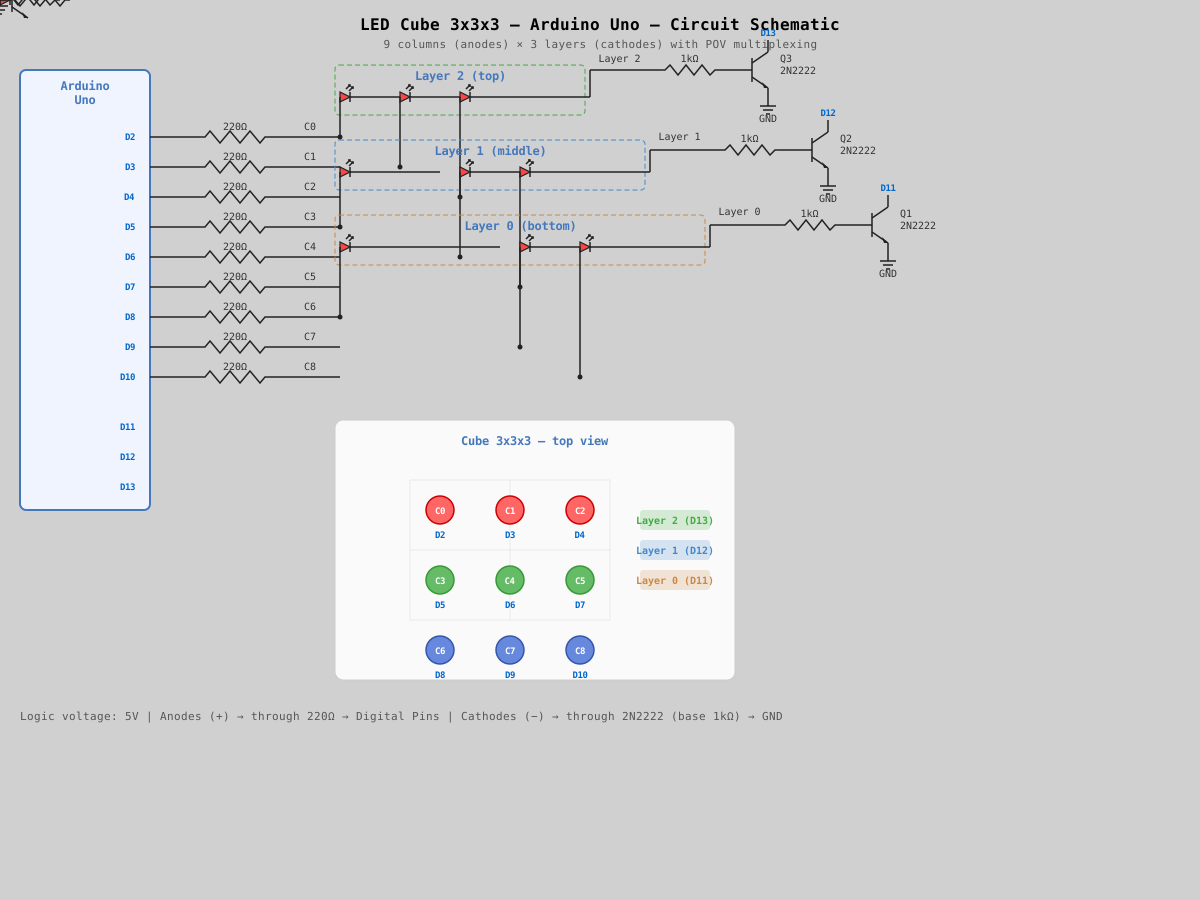
                        Arduino Uno
                     ┌──────────────────┐
                     │                  │
    Columns          │  D2  ──[220Ω]──── C0 (LED anode)
    (anodes)         │  D3  ──[220Ω]──── C1
                     │  D4  ──[220Ω]──── C2
                     │  D5  ──[220Ω]──── C3
                     │  D6  ──[220Ω]──── C4
                     │  D7  ──[220Ω]──── C5
                     │  D8  ──[220Ω]──── C6
                     │  D9  ──[220Ω]──── C7
                     │  D10 ──[220Ω]──── C8
                     │                  │
    Layers           │  D11 ──[1kΩ]──┐  │
    (cathodes         │  D12 ──[1kΩ]──┤  │
     via               │  D13 ──[1kΩ]──┤  │
     transistors)    │                │  │
                     │  GND ──────────┘  │
                     └──────────────────┘

    2N2222 transistor (for each layer):

        Arduino Pin ──[1kΩ]──► Base
                               Collector ◄── Layer cathodes (all 9 LEDs)
                               Emitter ──► GND
Pin Assignment
| Arduino Pin | Function |
|---|---|
| D2 | Column 0 (anode) |
| D3 | Column 1 |
| D4 | Column 2 |
| D5 | Column 3 |
| D6 | Column 4 |
| D7 | Column 5 |
| D8 | Column 6 |
| D9 | Column 7 |
| D10 | Column 8 |
| D11 | Layer 0 (bottom) |
| D12 | Layer 1 (middle) |
| D13 | Layer 2 (top) |
| GND | Transistor emitters |
Building the Cube
1. Preparing the LEDs
- Test each LED before soldering (with a 220 Ω resistor from 5V).
- Identify polarity: long leg = anode (+), short leg = cathode (−).
- Bend the cathode (−) of each LED at 90° — they will be connected horizontally to form a layer.
2. Making a Jig
- Draw a 3×3 grid on cardboard or plywood with ~20 mm spacing between centers.
- Drill 9 holes with a 5 mm diameter.
3. Soldering the Layers
- Insert 9 LEDs into the jig.
- Solder all cathodes (−) into a horizontal grid using copper wire.
- Repeat for all 3 layers. Test each layer!
4. Connecting the Columns
- Place the bottom layer on the breadboard.
- Solder the middle layer on top, connecting anodes (+) vertically.
- Solder the top layer.
- Use spacers of equal height between layers (~20 mm).
5. Connecting to Arduino
- 9 anodes (columns) → through 220 Ω resistors → pins D2–D10.
- 3 cathode layers → through 2N2222 transistors → pins D11–D13.
Code
/*
 * 3x3x3 LED Cube — Arduino Uno
 */

// === Pin configuration ===
const byte COL_PINS[9] = {2, 3, 4, 5, 6, 7, 8, 9, 10};
const byte LAYER_PINS[3] = {11, 12, 13};

#define NUM_LAYERS  3
#define NUM_COLS    9

uint16_t cube[NUM_LAYERS];
#define POV_DELAY 3

void displayCube() {
  for (byte layer = 0; layer < NUM_LAYERS; layer++) {
    for (byte l = 0; l < NUM_LAYERS; l++) digitalWrite(LAYER_PINS[l], LOW);
    for (byte col = 0; col < NUM_COLS; col++) digitalWrite(COL_PINS[col], (cube[layer] >> col) & 1);
    digitalWrite(LAYER_PINS[layer], HIGH);
    delay(POV_DELAY);
  }
  for (byte l = 0; l < NUM_LAYERS; l++) digitalWrite(LAYER_PINS[l], LOW);
}

void showFor(unsigned long duration) {
  unsigned long start = millis();
  while (millis() - start < duration) displayCube();
}

void clearCube() {
  for (byte i = 0; i < NUM_LAYERS; i++) cube[i] = 0;
}

void fillCube() {
  for (byte i = 0; i < NUM_LAYERS; i++) cube[i] = 0b111111111;
}

void setLed(byte x, byte y, byte z, bool state) {
  byte col = y * 3 + x;
  if (state) cube[z] |= (1 << col);
  else cube[z] &= ~(1 << col);
}

// Animations omitted for brevity in this snippet,
// but you can add your own!
// See full code for details.

void setup() {
  for (byte i = 0; i < NUM_COLS; i++) {
    pinMode(COL_PINS[i], OUTPUT);
    digitalWrite(COL_PINS[i], LOW);
  }
  for (byte i = 0; i < NUM_LAYERS; i++) {
    pinMode(LAYER_PINS[i], OUTPUT);
    digitalWrite(LAYER_PINS[i], LOW);
  }
  randomSeed(analogRead(A0));
  clearCube();
}

void loop() {
  fillCube();
  showFor(1000);
  clearCube();
  showFor(500);
}