Robot Car Remote
Wireless ESP32 + PS2 joystick remote that drives the ESP32-CAM 4WD robot car over Wi-Fi using HTTP commands.
Wireless Remote for the ESP32-CAM 4WD Robot Car
Build a remote with an ESP32 DevKit V1 and a PS2 joystick module that joins the robot's Wi-Fi access point and sends movement commands as HTTP requests. A push button toggles the robot's headlight LED.

Description
The ESP32-CAM robot creates a Wi-Fi access point (ESP32-CAM Robot, open network) and exposes a small HTTP API at http://192.168.4.1. The remote:
- Connects to the robot's AP and blinks the on-board LED while it searches for the network.
- Reads two ADC axes (VRX, VRY) from the joystick and decides direction: forward, backward, left, right, or stop.
- Sends HTTP
GET /go,/back,/left,/right,/stoponly when the direction changes, plus a 500 ms keep-alive resend so dropped packets don't strand the robot. - Reads a push button with 200 ms debounce and toggles the headlight via
/ledon//ledoff.
Components
| Component | Qty |
|---|---|
| ESP32 DevKit V1 | 1 |
| PS2 joystick module | 1 |
| Push button | 1 |
| ESP32-CAM 4WD robot car (LAFVIN kit) | 1 |
Wiring
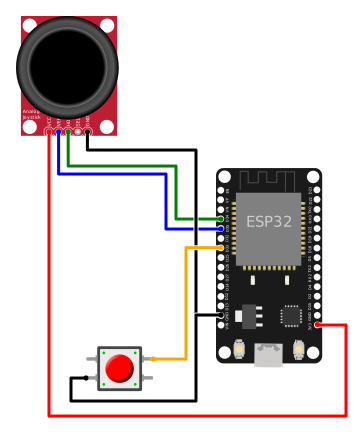
ESP32 DevKit V1
┌──────────────────────┐
│                      │
│  GPIO 34 ◄─── VRX   │  Joystick X axis (left/right)
│  GPIO 35 ◄─── VRY   │  Joystick Y axis (forward/back)
│  3.3V ────── +5V    │  Joystick power (3.3V is fine)
│  GND ─────── GND    │  Joystick ground
│                      │
│  GPIO 33 ◄─── BTN   │  Push button (other leg to GND)
│                      │
│  GPIO 2 ───► LED     │  Built-in LED (connection status)
│                      │
└──────────────────────┘
Why GPIO 34 and 35
They are input-only pins wired to ADC1. ADC2 cannot be used while Wi-Fi is active on the ESP32, so every analog read must stay on ADC1.
The joystick SW pin (stick press) is left unconnected — it is not used.
Joystick → direction mapping
The ADC range is 0–4095. Center is roughly 2048. We define a dead zone between 1400 and 2700 (center ± ~30%) to ignore noise when the stick is released.
         VRY < 1400
           ↑ FORWARD
           │
VRX < 1400 ◄── STOP ──► VRX > 2700
   LEFT     (dead zone)   RIGHT
           │
           ↓ BACKWARD
         VRY > 2700
When both axes leave the dead zone, the axis with the larger deflection from center wins.
Robot API
| Endpoint | Action |
|---|---|
GET /go |
Forward |
GET /back |
Backward |
GET /left |
Turn left |
GET /right |
Turn right |
GET /stop |
Stop motors |
GET /ledon |
Turn on headlight |
GET /ledoff |
Turn off headlight |
All return OK (text/html). The robot also exposes GET /capture for a single JPEG frame and GET :81/stream for a continuous MJPEG stream.
Code
import network
import urequests
import socket
import time
from machine import Pin, ADC

# --- Configurare hardware ---

# Joystick pe ADC1 (sigur cu Wi-Fi activ)
vrx = ADC(Pin(34))
vry = ADC(Pin(35))
vrx.atten(ADC.ATTN_11DB)  # Domeniu complet 0-3.3V
vry.atten(ADC.ATTN_11DB)

# Buton (active LOW cu pull-up intern)
button = Pin(33, Pin.IN, Pin.PULL_UP)

# LED de stare (încorporat pe DevKit V1)
led = Pin(2, Pin.OUT)

# --- Constante ---

ROBOT_IP = "http://192.168.4.1"
WIFI_SSID = "ESP32-CAM Robot"
WIFI_PASS = ""

# Praguri zonă moartă (centru ~2048, ±30%)
DEAD_LOW = 1400
DEAD_HIGH = 2700

# Timing (ms)
LOOP_INTERVAL = 20
REPEAT_INTERVAL = 150
DEBOUNCE_TIME = 200

# Direcții
STOP = "stop"
FORWARD = "go"
BACKWARD = "back"
LEFT = "left"
RIGHT = "right"

# --- Stare ---

prev_direction = None
last_command_time = 0
last_button_time = 0
light_on = False
wlan = None


def connect_wifi():
    """Conectează la AP-ul robotului. Clipește LED-ul cât timp caută."""
    global wlan
    wlan = network.WLAN(network.STA_IF)
    wlan.active(True)
    wlan.connect(WIFI_SSID, WIFI_PASS)

    while not wlan.isconnected():
        led.value(not led.value())
        time.sleep_ms(500)

    led.value(1)  # Solid ON = conectat
    print("Connected:", wlan.ifconfig())


def send_command(cmd):
    """Trimite GET la robot fire-and-forget — nu așteaptă răspunsul."""
    print("-> send_command:", cmd)
    try:
        s = socket.socket()
        s.settimeout(0.3)
        s.connect(("192.168.4.1", 80))
        req = "GET /" + cmd + " HTTP/1.1\r\nHost: 192.168.4.1\r\nConnection: close\r\n\r\n"
        s.send(req.encode())
        s.close()
    except Exception as e:
        print("   ERROR:", e)


def read_direction():
    """Citește joystick-ul și întoarce direcția."""
    x = vrx.read()
    y = vry.read()

    dx = x - 2048
    dy = y - 2048

    x_outside = x < DEAD_LOW or x > DEAD_HIGH
    y_outside = y < DEAD_LOW or y > DEAD_HIGH

    print("ADC x={} y={} dx={} dy={} x_out={} y_out={}".format(x, y, dx, dy, x_outside, y_outside))

    if not x_outside and not y_outside:
        return STOP

    # Prioritate: axa cu deflecția mai mare
    if abs(dx) >= abs(dy):
        return LEFT if x < DEAD_LOW else RIGHT
    else:
        return FORWARD if y < DEAD_LOW else BACKWARD


def handle_button():
    """Verifică butonul cu debounce. Comută proiectorul LED."""
    global last_button_time, light_on

    now = time.ticks_ms()
    btn = button.value()
    if btn == 0 and time.ticks_diff(now, last_button_time) > DEBOUNCE_TIME:
        print("BUTTON pressed (raw={})".format(btn))
        last_button_time = now
        light_on = not light_on
        send_command("ledon" if light_on else "ledoff")


def main():
    global prev_direction, last_command_time

    connect_wifi()

    while True:
        if not wlan.isconnected():
            led.value(0)
            connect_wifi()

        now = time.ticks_ms()

        # --- Joystick ---
        direction = read_direction()

        if direction != prev_direction:
            print("DIRECTION change: {} -> {}".format(prev_direction, direction))
            send_command(direction)
            prev_direction = direction
            last_command_time = now
        elif direction != STOP and time.ticks_diff(now, last_command_time) > REPEAT_INTERVAL:
            print("DIRECTION repeat: {}".format(direction))
            send_command(direction)
            last_command_time = now

        # --- Buton ---
        handle_button()

        time.sleep_ms(LOOP_INTERVAL)


main()
Current limitations
The robot firmware uses a fixed speed (speed = 150 of 255) and supports only four directions. Proportional speed or diagonal motion would require modifying the robot firmware and adding a /speed?val=N endpoint.
Future extensions
- OLED display for connection status and battery level.
- A second joystick for camera pan/tilt (using
/control?var=...&val=...). - Extra button to grab a JPEG with
GET /capture. - Proportional speed control once the robot firmware is extended.
Original sources
- LAFVIN kit — ESP32 Camera 4WD Robot Car Kit (Dropbox archive)