Servo
Drive an SG90 servo between 0° and 180° from the ESP32 using PWM at 50 Hz — the first step toward robot arms and steered RC cars.
Servo
A servo is a small geared motor that stops at a precise angle — exactly what you need for a robot arm, the steering of a small RC car, or a self-opening lid. Here we drive it from the ESP32 in MicroPython, through PWM at 50 Hz.

Description
A hobby servo (SG90, MG90, SG5010) expects a short pulse repeated every 20 ms on the signal wire. The pulse width sets the angle:
- ~0.5 ms → 0°
- ~1.5 ms → 90° (center)
- ~2.4 ms → 180°
There's no built-in Servo library on the ESP32 the way there is on Arduino — we use machine.PWM directly at 50 Hz and compute the duty from the angle. At 10-bit resolution (0–1023), a 1 ms pulse is duty ≈ 51 and a 2 ms pulse is duty ≈ 102.
Components
| Component | Quantity |
|---|---|
| ESP32 board (DevKit V1) | 1 |
| SG90 servo (9 g) | 1 |
| M-M jumper wires | 3 |
| External 5 V supply (recommended for 2+ servos) | as needed |
SG90 specs
- Operating voltage: 4.8 – 6 V
- Torque: ~1.6 kg·cm at 4.8 V
- Speed: ~0.12 s / 60°
Wiring
| Servo wire | Color | ESP32 |
|---|---|---|
| GND (−) | brown / black | GND |
| V+ | red | Vin / 5V (see note) |
| Signal | orange / yellow | GPIO 13 |
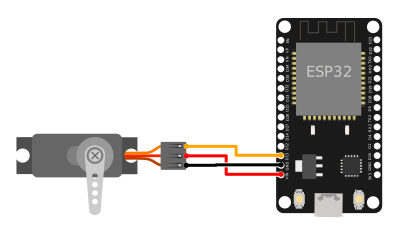
    ESP32                Servo SG90
   GPIO 13 ──── orange ── Signal
     5V / Vin ── red    ── Power (+)
     GND ────── brown  ── Ground (−)
Powering the servo
SG90 wants 5 V. The ESP32 3.3V pin is not enough — torque sags during motion and the board can reset from current spikes. Use the Vin pin (= 5 V when the board is powered over USB) for a single servo, or an external 5 V supply with a common ground for 2+ servos. Never power a servo from 3.3 V.
Code
from machine import Pin, PWM
import time

# --- Setup ---

SERVO_PIN = 13
FREQ = 50          # 50 Hz = 20 ms period (what the servo expects)

# Duty for SG90 at 10-bit resolution:
#   0°   → 0.5 ms pulse  → duty ≈ 26
#   90°  → 1.5 ms pulse  → duty ≈ 77
#   180° → 2.4 ms pulse  → duty ≈ 123
DUTY_MIN = 26
DUTY_MAX = 123

servo = PWM(Pin(SERVO_PIN), freq=FREQ, duty=0)


def set_angle(angle):
    """Set the servo angle between 0 and 180 degrees."""
    angle = max(0, min(180, angle))                    # clamp
    duty = DUTY_MIN + (DUTY_MAX - DUTY_MIN) * angle // 180
    servo.duty(duty)


def sweep():
    """Slow sweep 0° → 180° → 0°."""
    for a in range(0, 181, 2):
        set_angle(a)
        time.sleep_ms(15)
    for a in range(180, -1, -2):
        set_angle(a)
        time.sleep_ms(15)


try:
    while True:
        sweep()
except KeyboardInterrupt:
    set_angle(90)        # park at center
    time.sleep_ms(500)
    servo.deinit()
Run the script
- Plug the ESP32 into USB.
- In Thonny, paste the code and save it as
main.pyon the MicroPython device. - Press Run (F5). The servo shaft should slowly sweep from 0° to 180° and back.
If the servo jerks and then dies, see Troubleshooting.
Calibration
Cheap servos vary between units — your SG90's real travel may be 5°…175° rather than 0°…180°. If at angle=0 you hear a buzz (the shaft is jammed against a mechanical stop), bump DUTY_MIN up by 2-3 counts. If angle=180 doesn't reach the end, raise DUTY_MAX.
# Test the ends before using sweep()
set_angle(0)     # should glide cleanly to the left
time.sleep(1)
set_angle(180)   # then to the right
Example: angle from the REPL
Send an angle from Thonny's REPL and the servo goes straight there:
from machine import Pin, PWM

servo = PWM(Pin(13), freq=50)
DUTY_MIN, DUTY_MAX = 26, 123

def set_angle(a):
    a = max(0, min(180, a))
    servo.duty(DUTY_MIN + (DUTY_MAX - DUTY_MIN) * a // 180)

# In the REPL: set_angle(45), set_angle(120), etc.
Troubleshooting
Servo jitters without being commanded
- Current spikes. Make sure you power from Vin / 5V, not 3.3V.
- Add a 100 µF capacitor between V+ and GND, close to the servo.
- For 2+ servos, use an external 5 V supply and tie its ground to the ESP32 ground.
The ESP32 resets when the servo starts moving
- The servo's inrush current sags the rail below the reset threshold. Use external power, not USB.
The shaft slams a mechanical stop (audible buzz)
- You're commanding an angle outside the real range. See Calibration — tighten
DUTY_MIN/DUTY_MAX.
The servo moves the opposite way of what I expect
- Flip the mapping: replace
anglewith180 - angleinsideset_angle().
OSError: invalid pin on PWM(Pin(...))
- The pin can't do PWM (e.g. GPIO 34–39 are input-only). Move the signal to GPIO 13, 14, 25, 26, 27, 32, 33.
Extension ideas
- Joystick → servo: read a pot on GPIO 34 (ADC1) and map 0–4095 to 0–180°. See Robot Car Remote for a full example of joystick-on-ADC.
- Pan/tilt with two servos: one horizontal, one vertical, mounted on a small bracket — the basis for a camera that tracks an object.
- Robot status indicator: combine with the RGB LED to signal state (green = idle, red = moving).
- Wireless control: send the angle over ESP-NOW from a remote — no cables, no Wi-Fi.