Temperature & Humidity
Read DHT22 / DHT11 sensor data on an ESP32 and print values to the serial console every two seconds.
Temperature and Humidity
Reads temperature and humidity from a DHT22 (or DHT11) sensor connected to an ESP32 and prints the values to the serial console every 2 seconds using MicroPython.

Description
This script uses the built-in dht MicroPython library to communicate with a DHT22 sensor over a single data pin (GPIO 14). It reads the temperature in Celsius, converts it to Fahrenheit, and reads the relative humidity, printing all three values in a loop.
Code
from machine import Pin
from time import sleep
import dht

# DHT22 on GPIO 14
sensor = dht.DHT22(Pin(14))

# Uncomment for DHT11
# sensor = dht.DHT11(Pin(14))

while True:
  try:
    sleep(2)
    sensor.measure()
    temp = sensor.temperature()
    hum = sensor.humidity()
    temp_f = temp * (9/5) + 32.0
    print('Temperature: %3.1f C' %temp)
    print('Temperature: %3.1f F' %temp_f)
    print('Humidity: %3.1f %%' %hum)
  except OSError as e:
    print('Failed to read sensor.')
Wiring
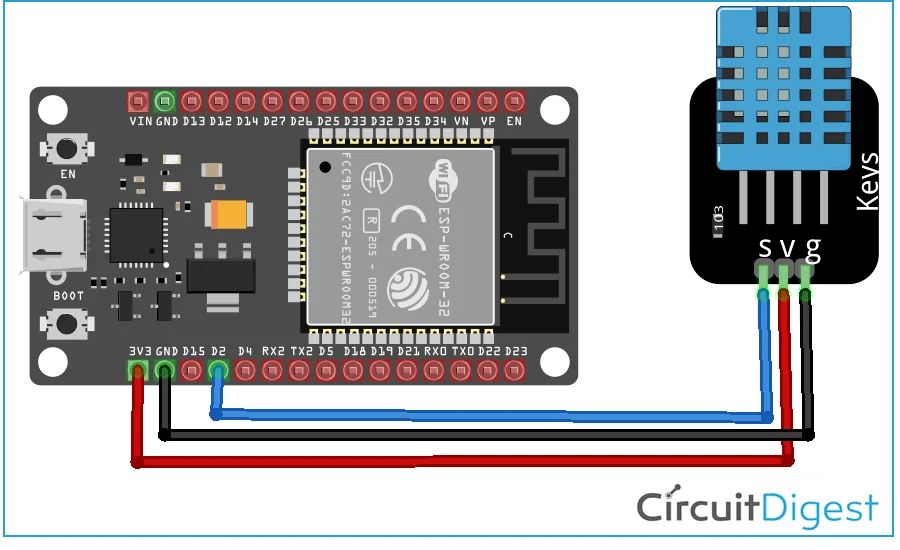
DHT22 (or DHT11) to ESP32
A 10 kΩ pull-up resistor between DATA and VCC is recommended for reliable communication.
DHT11 vs DHT22: The DHT11 has lower accuracy (±2°C, ±5% RH) and a narrower range. The DHT22 is more precise (±0.5°C, ±2–5% RH) and supports a wider temperature range.
Wiring Diagrams