Sound Sensor
Detect sound on the ESP32 with an electret microphone module — analog output for level, digital output for an alarm above a tunable threshold.
Sound sensor
The KY-038 sound module (or similar LM393-based board) lets the ESP32 "hear" its surroundings: continuous level on the analog output, plus a digital comparator that fires when the sound crosses a tunable threshold. Great for clap detection, "clap-on" lamps, VU meters, or voice-activated triggers.

Description
On the module you'll find an electret condenser microphone — a small capsule whose diaphragm vibrates with sound pressure. An LM393 comparator amplifies the signal and compares it against a threshold set by the on-board pot.
The module exposes two signals:
- AO (Analog Out) — voltage proportional to sound intensity in real time. Useful for VU meters, level logging, proportional triggers.
- DO (Digital Out) —
0when the sound crosses the threshold,1while quiet (active LOW). Useful for on/off alarm-style detection.
Two LEDs on the module
The red PWR LED confirms power. The second LED, usually labeled L1 or DO, lights up when DO goes LOW (sound detected). Use it to calibrate the threshold: turn the pot until it goes dark in silence.
Components
| Component | Quantity |
|---|---|
| ESP32 board (DevKit V1) | 1 |
| Sound sensor module (KY-038 or similar, LM393-based) | 1 |
| F-M jumper wires | 4 |
Wiring
| Module pin | ESP32 | Notes |
|---|---|---|
| VCC (or +) | 3.3V | 3.3 V is perfectly fine — no voltage issues for the ESP32 |
| GND (or −) | GND | shared ground |
| AO | GPIO 34 | analog output, ADC1 |
| DO | GPIO 35 | digital output, read as input |
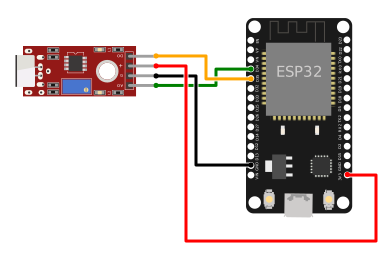
    ESP32                Sound sensor
    3.3V ──────────── VCC
    GND ───────────── GND
    GPIO 34 ◄────────── AO  (analog)
    GPIO 35 ◄────────── DO  (digital)
Power at 3.3 V, not 5 V
Many modules are labeled "5 V" but run happily at 3.3 V. That matters for the ESP32: its GPIOs are not 5 V tolerant, so powering the sensor at 5 V can put 5 V on AO/DO → risky for the GPIO. At 3.3 V the outputs stay in the safe range.
Input-only pins
GPIO 34 and 35 are input-only on the ESP32 — perfect for reading sensor outputs, you cannot drive them. They're also on ADC1, so they keep working even with Wi-Fi active (ADC2 doesn't).
Code
from machine import Pin, ADC
import time

# --- Setup ---

ao = ADC(Pin(34))
ao.atten(ADC.ATTN_11DB)          # full 0-3.3 V range

do = Pin(35, Pin.IN)             # module's digital output

# Software threshold for AO (0-4095). Calibrate to your room's quiet level.
ANALOG_THRESHOLD = 2500


def read_sound():
    """Return (analog_level, noisy_flag)."""
    level = ao.read()
    # DO is active LOW: 0 = sound above the pot's threshold
    digital_noise = (do.value() == 0)
    return level, digital_noise


print("Sound sensor running. Ctrl+C to stop.\n")

while True:
    try:
        level, noisy = read_sound()
        analog_noise = level > ANALOG_THRESHOLD

        flag = ""
        if noisy or analog_noise:
            flag = "  [NOISE]"

        print(f"AO = {level:4d}   DO = {'LOW (sound)' if noisy else 'HIGH (quiet)'}{flag}")
        time.sleep_ms(50)
    except KeyboardInterrupt:
        print("\nStop.")
        break
Run the script
- Assemble the circuit: VCC to 3.3V, GND to GND, AO to GPIO 34, DO to GPIO 35.
- In Thonny, paste the code and press Run (F5).
- Clap once — the console shows something like:
AO =  812   DO = HIGH (quiet)
AO =  834   DO = HIGH (quiet)
AO = 3902   DO = LOW (sound)  [NOISE]
AO = 4061   DO = LOW (sound)  [NOISE]
AO = 1284   DO = HIGH (quiet)
Calibration
Digital threshold (on-board pot)
Turn the blue pot on the module with a small screwdriver:
- Make the room quiet.
- Watch the second LED (
DO/L1). In silence it should be off. - If it's on, rotate the pot (these are usually 10+ turn precision pots) until it goes dark.
- Clap to test — the LED should blink with each sound.
Analog threshold (software)
Read AO with your room's background noise and set ANALOG_THRESHOLD to idle_value + 1500. Quick recipe:
# Average 50 readings during silence
samples = [ao.read() for _ in range(50)]
baseline = sum(samples) // len(samples)
print("Quiet:", baseline)
ANALOG_THRESHOLD = baseline + 1500
Example: blink LED on a clap
The onboard LED (GPIO 2) lights up for 1 second on every detected sound:
from machine import Pin, ADC
import time

ao = ADC(Pin(34)); ao.atten(ADC.ATTN_11DB)
do = Pin(35, Pin.IN)
led = Pin(2, Pin.OUT)

led_off_at = 0

while True:
    if do.value() == 0:                      # sound detected
        led.value(1)
        led_off_at = time.ticks_add(time.ticks_ms(), 1000)

    if led.value() == 1 and time.ticks_diff(led_off_at, time.ticks_ms()) <= 0:
        led.value(0)

    time.sleep_ms(20)
Example: clap-clap toggle
Toggle the LED only on two claps within a short window — the classic "clap-on" lamp:
from machine import Pin
import time

do = Pin(35, Pin.IN)
led = Pin(2, Pin.OUT)

last_clap = 0
state = False

while True:
    if do.value() == 0:                      # sound detected
        now = time.ticks_ms()
        if 100 < time.ticks_diff(now, last_clap) < 800:
            state = not state                # two claps in 0.1-0.8 s
            led.value(state)
        last_clap = now
        time.sleep_ms(200)                   # debounce — ignore echoes
    time.sleep_ms(10)
100 < dt < 800 rejects both close echoes (under 100 ms — the same sound firing twice) and long pauses (over 800 ms — uncorrelated claps).
Troubleshooting
The sensor triggers constantly, even without sound
- The pot threshold is too low. Turn it down (in silence) until the
DOLED goes dark. - The mic is picking up steady noise — fridge, computer fan, A/C. Move the sensor.
- Table vibrations propagate through stiff wires. Place the module on foam or something soft.
The sensor doesn't react at all
- Check power: the
PWRLED must be lit. - The threshold is too high — turn the pot the other way.
- Sound isn't reaching the mic — point the diaphragm at the source.
- Electret mics are directional; don't lay the module face-down on the bench.
AO swings between 0 and 4095 even in silence
- Cables are too long or noisy. Use short wires (under 20 cm).
- The module is too close to the ESP32 Wi-Fi antenna — separate them by 5-10 cm.
- Average several readings to stabilize the value:
I want decibels, not just a level
- KY-038 modules are not calibrated for dB. For real SPL you need dedicated modules (e.g. MAX9814 with AGC) or an I2S microphone (INMP441, SPH0645) with FFT processing — significantly more complex.
Extension ideas
- Trigger a servo (Servo) on a clap — a lid that opens to sound.
- Drive an RGB LED color (RGB LED) by real-time sound level — green for quiet, red for loud.
- Web server with live level: extend the Temperature Web Server project, replacing the DHT22 read with an AO read.
- Remote clap detection: ship the events over ESP-NOW to a master board that counts claps across multiple rooms.